
• Do not use Discord to host any images you post, these links expire quickly! You can learn how to add images to your posts here.
  • Reminder: AI-generated content is not allowed on the forums per the Rules and Regulations. Please contact us if you have any questions!
HGSS style Multi-Save

Resource HGSS style Multi-Save 2.0

ChromeValiant

Novice
Member
Joined
Aug 27, 2024
Posts
37
Pronouns
he/him
ChromeValiant submitted a new resource:

HGSS style Multi-Save - Multi-Save backport from Maruno's v22 dev branch of Essentials

This plug-in script backports Maruno's work from the Pokemon Essentials dev branch (where v22 is being developed) to function with v21.1.
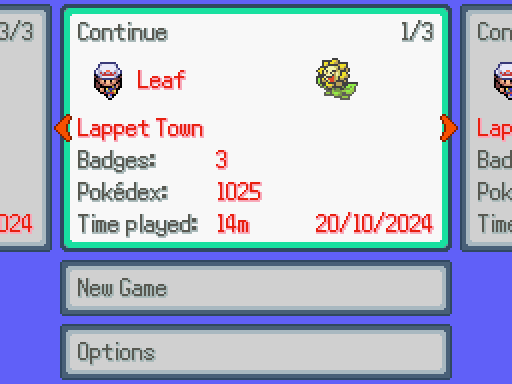
tyd3ka.png

credit: Maruno (from Dev Cafe discord)
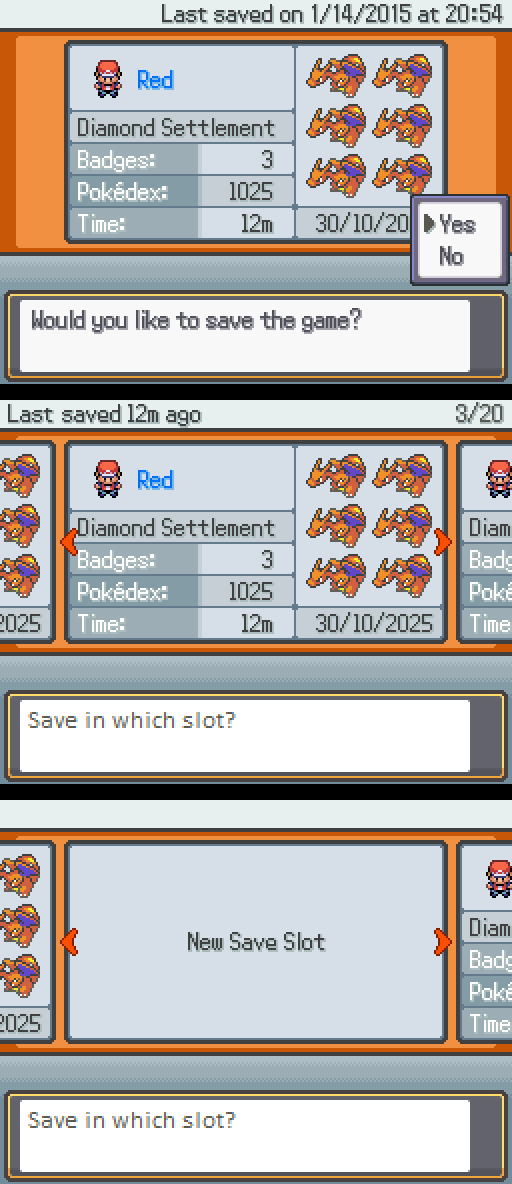
fbnnra.png

credit: Maruno (from Dev Cafe discord)

I also tweaked the "Quit Game" option from the Pause Menu to return to the Title...

Read more about this resource...
 
Could you backport other things from v22, like the options menu? I really like the multi-page options menu but I suck at backporting
 
ChromeValiant updated HGSS style Multi-Save with a new update entry:

2.0 Update: New folder name & functionality!

# - Folder & Plugin name changed from "HGSS Save and Load Screen" -> "HGSS Multi-Save"
# - New Load UI screen appears correctly when running outside of Debug mode
# - Compatibility with my Elite Battle: DX Renovation Project for v21.1
# - Re-Organized Settings / Configuration file, along with adding Maruno's descriptions from dev branch

Read the rest of this update entry...
 
Incompatible with Lin's Weather System :c


2025-12-23-11-34-50-Pok-mon-Essentials-v21-1.png


2025-12-23-11-35-18-Pok-mon-Essentials-v21-1.png
Yo, Julie! Good news: this should be resolved by replacing Lin's Weather System\01 - Main Code\03 - Handler.rb with:


Ruby:
Expand Collapse Copy
#===============================================================================
# * Weather System Handler
#===============================================================================

# Code that creates the weather on map when the player enters it.
# Weather is forced to clear when entering a map that isn't outdoors.
EventHandlers.add(:on_enter_map, :change_weather,
  proc { |_old_map_id|
    next if !$game_map
   
    # --- HGSS FIX START ---
    # This line prevents the "undefined method actualWeather for nil:NilClass" crash.
    # It ensures the system variable exists before the code below tries to read it.
    $WeatherSystem = WeatherSystem.new if !$WeatherSystem
    # --- HGSS FIX END ---

    pbInitializeWeather if !$WeatherSystem.actualWeather || $WeatherSystem.actualWeather.length == 0
    $game_screen.weather(:None,0,0) unless $game_map.metadata&.outdoor_map
#    $game_screen.weather(:None,0,0) if WeatherConfig::NO_WEATHER
    next unless $game_map.metadata&.outdoor_map
    next if WeatherConfig::NO_WEATHER
    pbFindZone
    i = $WeatherSystem.currentZone
#    $game_screen.weather(:None,0,0) if $WeatherSystem.currentZone == nil
    next if $WeatherSystem.currentZone == nil
    pbUpdateWeather(i) if !WeatherConfig::FORCE_UPDATE
    weather = $WeatherSystem.actualWeather[i].mainWeather
    weather = pbCheckValidWeather(weather, i)
    weather = :None if PBDayNight.isNight? && weather == :Sun
    next if $game_screen.weather_type == weather
    power = (weather == :None) ? 0 : 9
    duration = 0
    $game_screen.weather(weather,power,duration)
  }
)

# Code that clears the weather when the player leaves a map.
EventHandlers.add(:on_leave_map, :end_weather_system,
  proc { |new_map_id, new_map|
    $game_screen.weather(:None,0,0) if WeatherConfig::NO_WEATHER
  }
)
 
Back
Top