• Do not use Discord to host any images you post, these links expire quickly! You can learn how to add images to your posts here.
  • Reminder: AI-generated content is not allowed on the forums per the Rules and Regulations. Please contact us if you have any questions!
Deluxe Battle Kit [v21.1]

Resource Deluxe Battle Kit [v21.1] v1.2.9

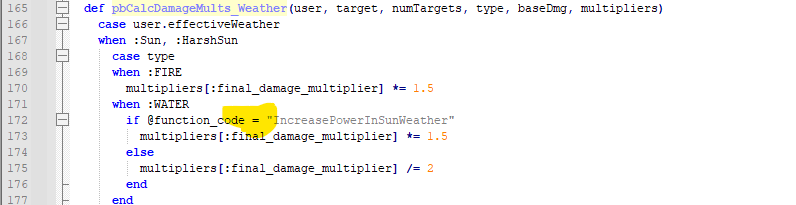
Hello, I'm really enjoying your kit, but found a bug from [002] Damage Calc Refactor.rb.

Ruby:
Expand Collapse Copy
 def pbCalcDamageMults_Weather(user, target, numTargets, type, baseDmg, multipliers)
    case user.effectiveWeather
    when :Sun, :HarshSun
      case type
      when :FIRE
        multipliers[:final_damage_multiplier] *= 1.5
      when :WATER
        if @function_code = "IncreasePowerInSunWeather" # <== HERE!!
          multipliers[:final_damage_multiplier] *= 1.5
        else
          multipliers[:final_damage_multiplier] /= 2
        end
      end
This makes ALL Water-type moves goes stronger in Sun weather. I think this bug can be fixed by putting == instead =.
Noted.
 
I'm sorry guys but I'm not the best at scripting and I'm trying to resolve this bug. Im using several Deluxe Battle Kit plugins and my issue is when I catch a wild pokemon the game crashes and I get this error message. I'm trying to use chatgpt to resolve it but I don't know what's going on. Could anyone please help me:

[Pokémon Essentials version 21.1]

[v21.1 Hotfixes 1.0.9]

Exception: ArgumentError

Message: wrong number of arguments (given 0, expected 1)

Backtrace:

[Deluxe Battle Kit] [003] Deluxe Battle Rules.rb:213:in `pbStorePokemon'

[[DBK] Raid Battles] [001] Battle - Raid Properties.rb:124:in `pbStorePokemon'

Battle_CatchAndStoreMixin:98:in `block in pbRecordAndStoreCaughtPokemon'

Battle_CatchAndStoreMixin:83:in `each'

Battle_CatchAndStoreMixin:83:in `pbRecordAndStoreCaughtPokemon'

[Generation 9 Pack] [005] Restore Consumable Item.rb:134:in `pbRecordAndStoreCaughtPokemon'

[[MUI] Enhanced Pokemon UI] [002] Legacy Data.rb:278:in `pbRecordAndStoreCaughtPokemon'

[Deluxe Battle Kit] [003] Deluxe Battle Rules.rb:209:in `pbRecordAndStoreCaughtPokemon'

[[DBK] Raid Battles] [001] Battle - Raid Properties.rb:134:in `pbRecordAndStoreCaughtPokemon'

Battle_StartAndEnd:480:in `pbEndOfBattle'
The Raid Battles plugin is broken.
 
Whenever I attack with any move, this happens:

[Pokémon Essentials version 21.1]
[v21.1 Hotfixes 1.0.9]

Exception: NoMethodError
Message: undefined method `pbAdditionalEffectChance' for #<Battle::Move::None>

Backtrace:
Battler_UseMove:716:in `block in pbProcessMoveHit'
Battler_UseMove:714:in `each'
Battler_UseMove:714:in `pbProcessMoveHit'
Battler_UseMove:409:in `block in pbUseMove'
Battler_UseMove:407:in `times'
Battler_UseMove:407:in `pbUseMove'
[Deluxe Battle Kit] [001] Animation Utilities.rb:278:in `block in pbProcessTurn'
PBDebug:6:in `logonerr'
[Deluxe Battle Kit] [001] Animation Utilities.rb:278:in `pbProcessTurn'
Battle_AttackPhase:128:in `block (2 levels) in pbAttackPhaseMoves'

It doesn't crash the game, but it does happen every time I attack, which gets very annoying. I also compared all the script sections mention here with a fresh copy of Pokemon Essentials, and they are exactly the same, but it works in the fresh copy.
It doesn't look like this is related to DBK, tbh.
 
Does anybody know what this means and if it´s my fault?
[End of round 18]

**Exception: undefined method `/' for nil:NilClass
Section433:12:in `initialize'
Section439:68:in `new'
Section439:68:in `block in pbGainExp'
Section439:18:in `each'
Section439:18:in `pbGainExp'
Section160:746:in `pbEndOfRoundPhase'
Section160:833:in `pbEndOfRoundPhase'
Section231:41:in `pbEndOfRoundPhase'
[Deluxe Battle Kit] [001] Midbattle Overwrites.rb:457:in `pbEndOfRoundPhase'
[[DBK] Dynamax] [011] Battle.rb:186:in `pbEndOfRoundPhase'
[[DBK] Z-Power] [003] Battle_Misc.rb:70:in `pbEndOfRoundPhase'
Section151:342:in `block (2 levels) in pbBattleLoop'
Section017:6:in `logonerr'
Section151:342:in `block in pbBattleLoop'
Section151:324:in `loop'
Section151:324:in `pbBattleLoop'
Section414:102:in `pbStartBattleCore'
Section151:271:in `pbStartBattle'
Section260:521:in `block (2 levels) in start_core'
Section261:55:in `pbSceneStandby'
Section260:521:in `block in start_core'
Section261:126:in `pbBattleAnimation'
Section260:520:in `start_core'
Section260:486:in `start'
Section005:206:in `eriksbetafight'
(eval):1:in `execute_script'
Section038:138:in `eval'
Section038:138:in `execute_script'
Section039:1177:in `command_355'
Section039:116:in `execute_command'
Section038:130:in `block in update'
Section038:86:in `loop'
Section038:86:in `update'
[Following Pokemon EX 1.1] Refresh.rb:268:in `update'
Section037:167:in `block in update'
Section037:166:in `loop'
Section037:166:in `update'
Section426:187:in `update'
[Following Pokemon EX 1.1] Refresh.rb:178:in `update'
Section410:247:in `block in main'
Section410:235:in `loop'
Section410:235:in `main'
Section452:39:in `mainFunctionDebug'
Section452:22:in `block in mainFunction'
Section019:81:in `pbCriticalCode'
Section452:22:in `mainFunction'
Section452:49:in `block in <main>'
Section452:48:in `loop'
Section452:48:in `<main>'
-e:in `eval'
This doesn't look related to DBK.
 
It's been a while since this was mentioned, but I thought it would be good to bring it up here.
Some time ago, someone mentioned that Sun and Rain were not correctly modifying Fire/Water type moves.
It turns out it was a = instead of == on "Damage Calc Refactor". Wrigty helped find the solution.

input_icons.png
 
I just installed DBK and it's working good so far but the Mega Animation is not working, it's just doing the quick-change one, despite it being set to true. I have Gen 9 Animation Project. Is that conflicting with it?
 
I just installed DBK and it's working good so far but the Mega Animation is not working, it's just doing the quick-change one, despite it being set to true. I have Gen 9 Animation Project. Is that conflicting with it?
Probably. Just delete any existing Mega animations added by the pack.
 
Probably. Just delete any existing Mega animations added by the pack.
Yeah, I found the solution by simply renaming the CommonAnimation:MegaAnimation in the Debug menu as MegaAnimationOld. Same with the Primal Reversions. Didn't need to delete anything. Works now. Appreciate the help. 😁
 
Back
Top